Sell access to a private GitHub repository. Creem invites the buyer after they pay and removes them after a refund, a chargeback or the end of their subscription.
Sell access to a private GitHub repository as part of a product. After paying, the buyer connects their GitHub account and Creem invites it to the repository. When the order is refunded or charged back, or the subscription ends, Creem removes it again.
One-time product: the buyer keeps access until the order is fully refunded or charged back.
Subscription: the buyer keeps access until the subscription ends, its first payment is fully refunded, or one of its payments is charged back.
Common Use Cases
Boilerplates and starter kits: sell a codebase and ship updates through the same repository
Paid libraries and components: give customers the source instead of a zip file
Sponsorware and early access: let subscribers into a repository before it goes public
Courses and templates: keep the example code next to the lessons it belongs to
Before You Start
The repository must be private and owned by a GitHub organization. Public repositories and
repositories of a personal account are listed in the product form, but can’t be selected.
You need to be the owner of the Creem store and an owner of the GitHub organization.
A GitHub organization can be connected to one Creem store at a time.
Each buyer is added to the repository as an outside collaborator. On a paid GitHub plan, each one can take a paid seat in your organization. If you don’t want to pay GitHub for a seat per buyer, sell from an organization on GitHub’s free plan.
Setting It Up
1
Connect your GitHub organization
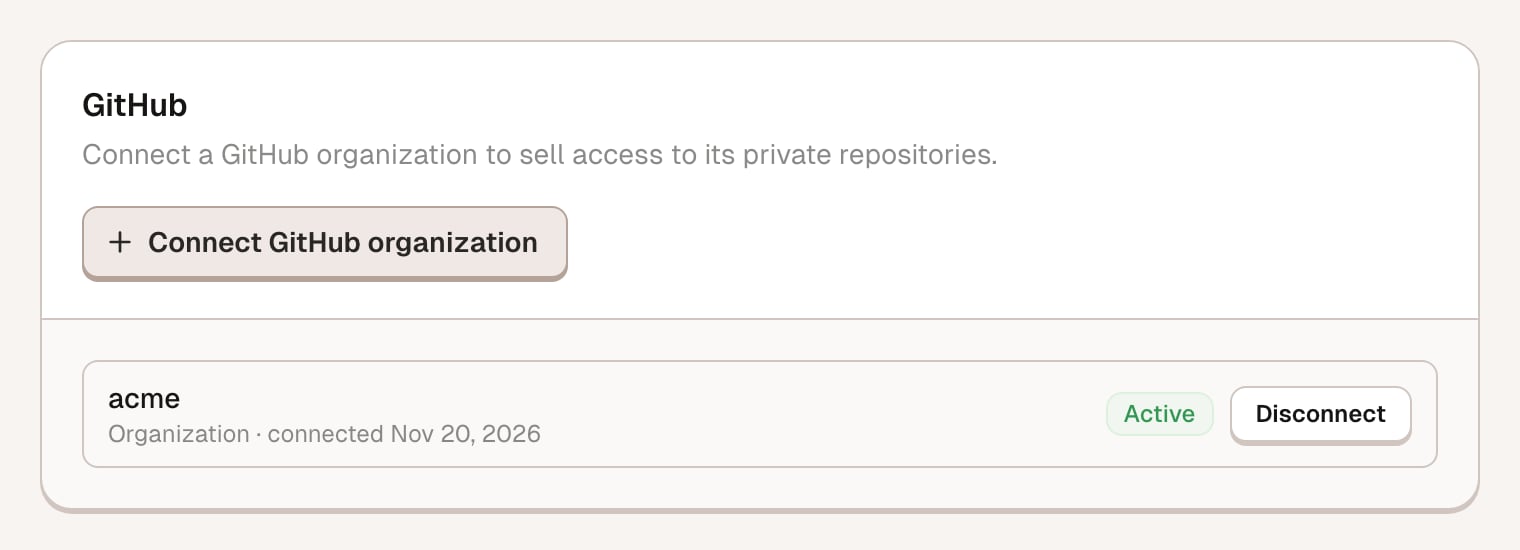
In the Creem dashboard, go to Settings → Integrations and click Connect GitHub organization.GitHub asks you to install the Creem app on your organization. Choose Only select repositories and pick the repositories you want to sell. Creem only sees the repositories you pick here.GitHub then sends you back to Creem, and the organization is listed as Active.
Settings → Integrations with one connected organization
The connection link is valid for 10 minutes. If it expires, click Connect GitHub organization again.If you aren’t an owner of the organization, GitHub sends your install request to its owners. Once one of them has installed the app, connect again while signed in to GitHub as an owner.
2
Add the repository to a product
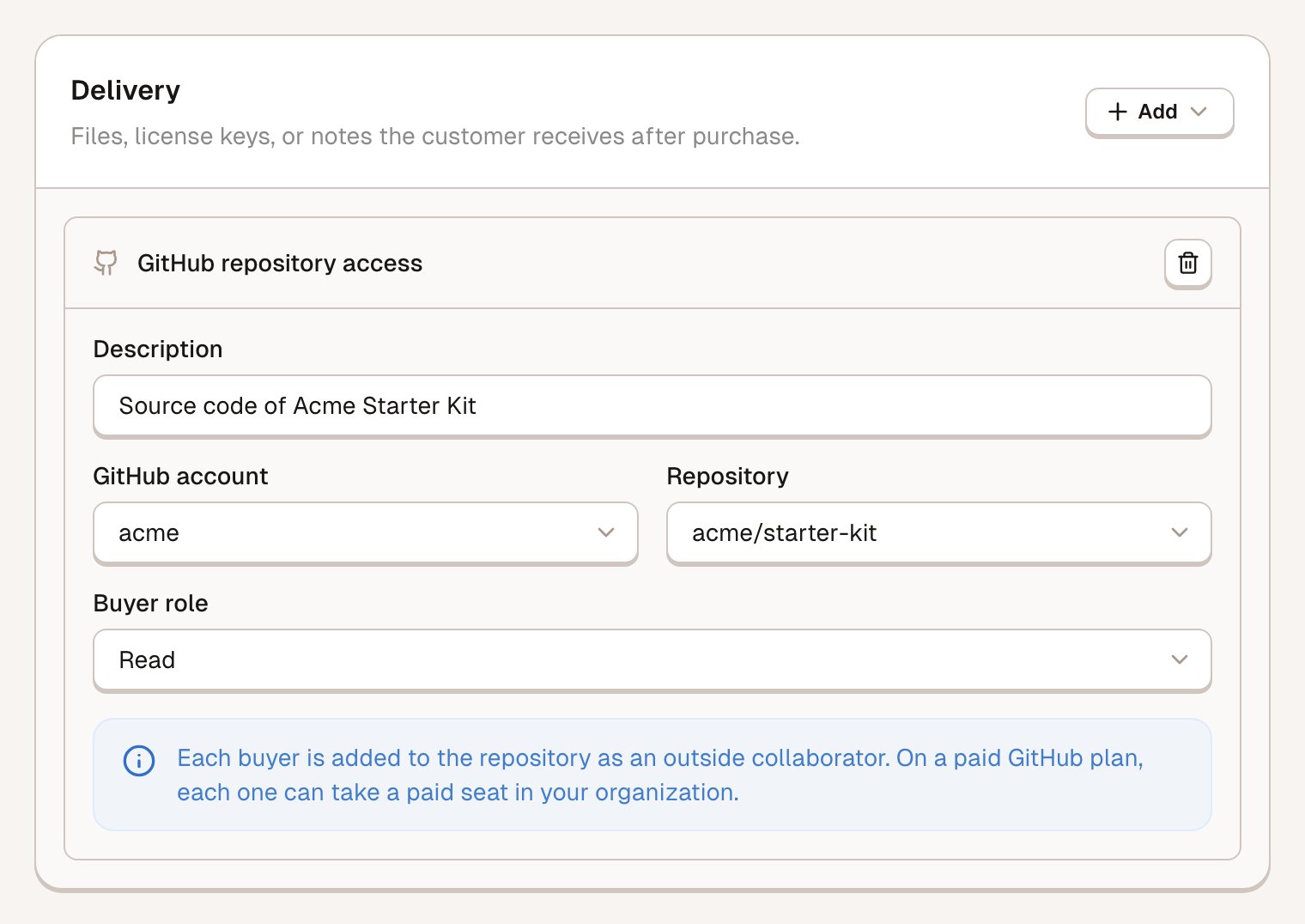
Go to Products, then create a product or open an existing one. Under Delivery, add GitHub repository access and choose:
GitHub account: the organization you connected
Repository: the private repository the buyer gets
Buyer role: what the buyer can do in the repository (see Buyer roles)
The GitHub repository access item in the product form
To sell several repositories with one product, add GitHub repository access once per repository.
3
Save the product
Every purchase made after you save includes access to the repository.
Buyer roles
Role
What the buyer can do
Read
View and clone the repository. The right choice for most products.
Triage
Read, and manage issues and pull requests: close, label and assign them.
Write
Read, and push code to the repository, including to branches without protection.
Maintain
Write, and manage some of the repository’s settings.
The admin role isn’t offered. To change the role, pick another Buyer role in the product form and save. The new role applies to purchases made after the change; buyers who already bought keep theirs.
What the Buyer Sees
Buyers don’t type a GitHub username. They sign in to GitHub, so access always goes to an account they control.
1
Connect GitHub after paying
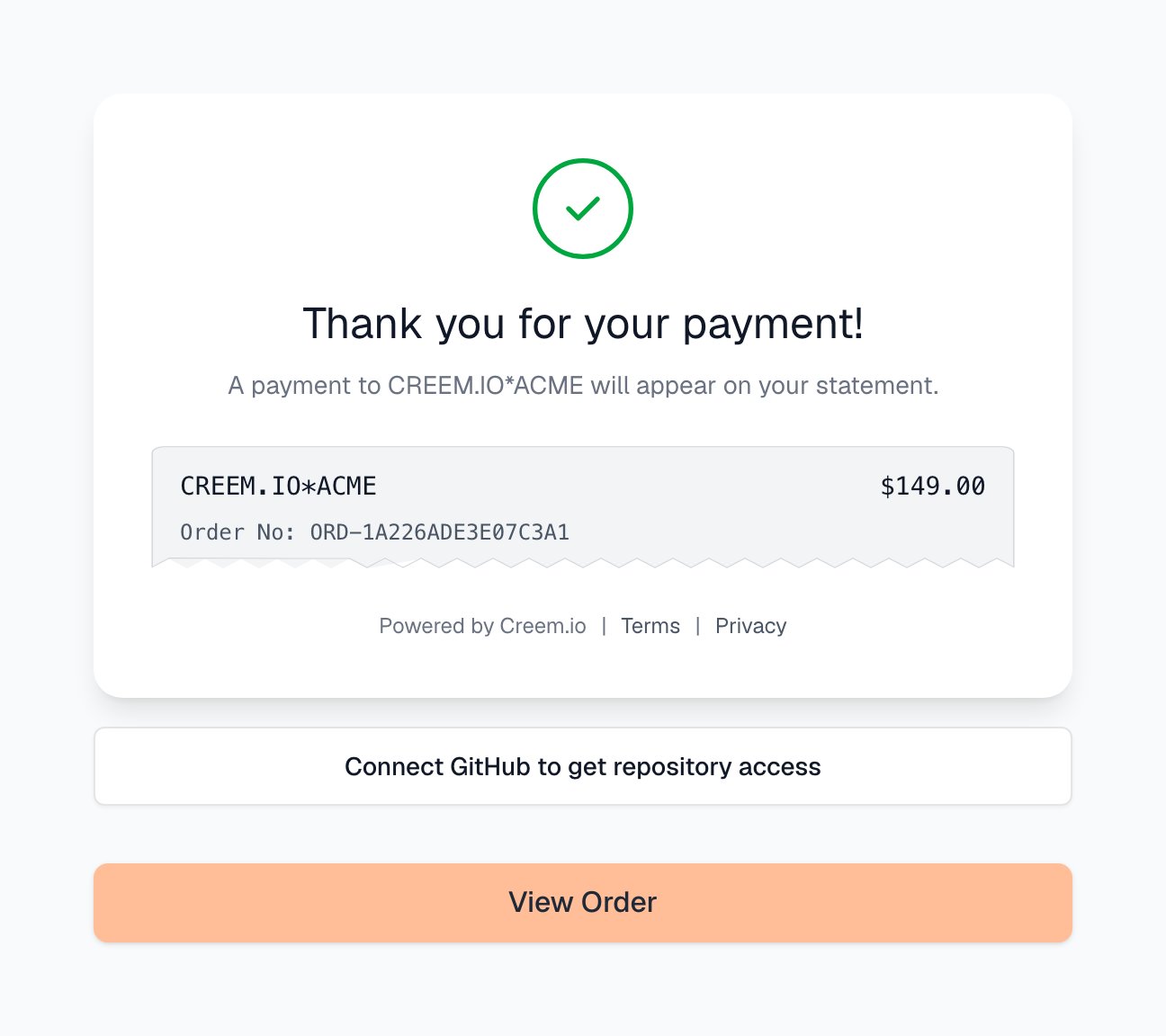
The confirmation page shows a Connect GitHub to get repository access button. The receipt email has a Connect GitHub button too, which opens the customer portal.
The confirmation page of an order that includes a repository
2
Sign in to GitHub
Creem only reads which GitHub account it is. It gets no access to the buyer’s repositories.
3
Accept the invitation
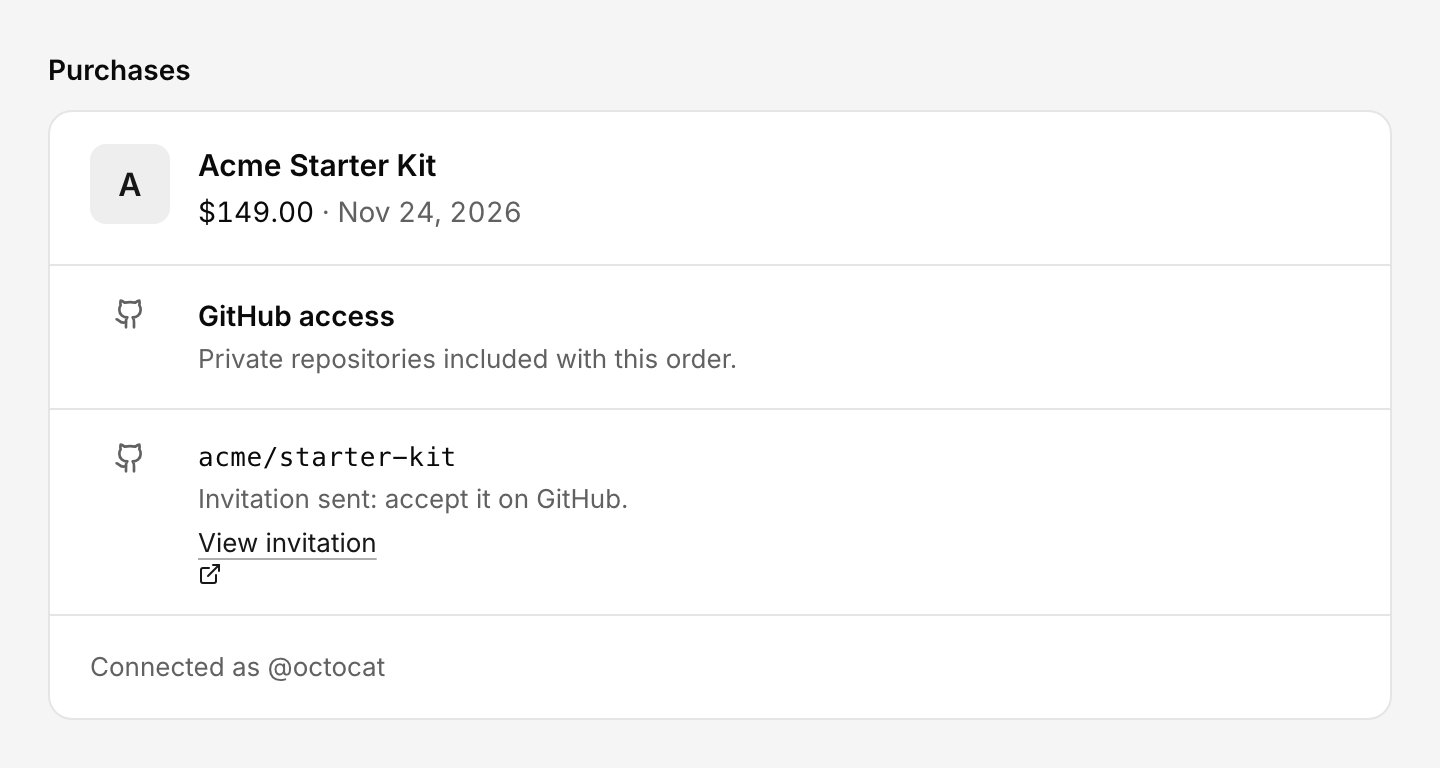
GitHub sends an invitation to the repository. The buyer accepts it on GitHub, or through View invitation on the order in the customer portal.
The order in the customer portal while the invitation is open
4
Use the repository
Once the buyer accepts, the order shows You have access. and an Open repository link.
The button on the confirmation page works for one hour after the payment, in the browser that paid. After that, and for embedded checkouts or checkouts on a custom domain, the buyer connects GitHub from the customer portal: they sign in with the email they used for the order and open the order’s GitHub access section.Each order is connected to one GitHub account, and the buyer can’t switch it themselves. If they connected the wrong account, the store owner can reset it.If the buyer’s GitHub account already has access to the repository at the role you sell or a higher one, for example because they are a member of your organization, GitHub sends no invitation and the order shows You have access. right away. To test the invitation yourself, buy with a GitHub account that isn’t in your organization.
Invitations that expire
GitHub invitations expire after 7 days. When an invitation expires or is declined, the buyer can click Send the invitation again in the customer portal, at most once every 24 hours. The store owner can re-invite from the dashboard without waiting.
Managing Access in the Dashboard
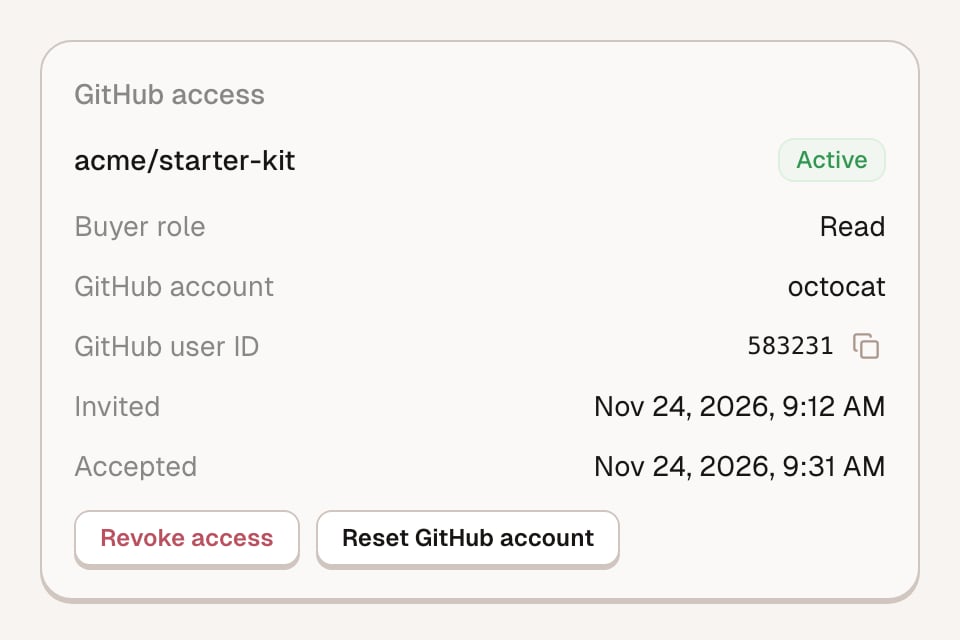
Open a payment in Payments, or a customer in Customers. The details panel has a GitHub access section with one entry per repository: the buyer role they bought, the buyer’s GitHub account and user ID, when they were invited and accepted, and when and why access was removed.
The GitHub access section of a payment
Status
Meaning
Awaiting GitHub account
The buyer paid but hasn’t connected a GitHub account yet.
Invite pending
The invitation is queued and will be sent shortly.
Invited
GitHub sent the invitation. The buyer hasn’t accepted it yet.
Active
The buyer accepted and has access.
Invite expired
The invitation expired or was declined.
Failed
The invitation couldn’t be sent. The panel shows the reason.
Resetting account
The store owner reset the GitHub account. Creem is removing the old account.
Removing access
Access is ending and Creem is removing the buyer on GitHub.
Access removed
The buyer no longer has access through this order.
Removal failed
Creem couldn’t remove the buyer on GitHub. Remove them in the repository’s settings.
An accepted invitation shows as Active within about 15 minutes.The store owner can also act on an order from this section:
Re-invite on an entry that is Invite expired or Failed. GitHub sends the new invitation within a few minutes.
Revoke access removes the buyer from every repository of the order. It doesn’t refund the order, and access isn’t restored automatically, not even if the subscription is reactivated.
Reset GitHub account removes the connected account from every repository of the order. The buyer then connects a new account from their order in the customer portal. Creem doesn’t email the buyer about the reset, so let them know.
When Access Ends
Creem removes the buyer from the repository, or cancels their pending invitation, in these cases:
Event
What happens
Full refund of the purchase
Access is removed.
Partial refund
Access stays. Several partial refunds that add up to the full amount remove it.
Refund of a single subscription renewal
Access stays while the subscription is active.
Chargeback opened
Access is removed. Winning the dispute doesn’t restore it.
Subscription canceled at the end of the billing period
Access stays until the paid period ends, then it is removed.
Subscription canceled immediately, expired or unpaid
Access is removed.
Subscription past due or paused
Access stays.
The store owner clicks Revoke access
Access is removed. The order isn’t refunded.
Removal usually takes a few minutes.
Removing a buyer from the repository doesn’t remove the copies they already cloned. Treat a
one-time sale of repository access like a file download when you decide your refund policy.
Access isn’t restored automatically. To give it back, for example after you win a dispute or a subscriber pays again, add the buyer to the repository on GitHub yourself.
Removal applies to the GitHub account, not to the order. If the same GitHub account bought access to the same repository twice, ending one order’s access removes the account from the repository, while the other order’s entry still shows Active.
Existing collaborators are removed too. If the buyer was already a collaborator on the repository before they bought it, they lose that access when the order’s access ends. Members of your organization keep the access they have through the organization or a team.
Limits
50 invitations per repository per 24 hours. This is GitHub’s limit. Creem retries invitations above it later. If an entry ends up Failed, click Re-invite once 24 hours have passed.
One GitHub account per order.
Organization-owned private repositories only. On a personal account’s repository, GitHub gives every collaborator write access, so those repositories can’t be sold.
Disconnecting GitHub
In Settings → Integrations, the store owner can click Disconnect next to an organization.
Disconnecting in Creem removes the organization from Creem, so its repositories can’t be picked for a product anymore. It doesn’t stop sales: products that already sell its repositories keep giving new buyers access, even though the product form shows them as stopped working. To stop selling a repository, remove GitHub repository access from those products. The Creem app stays installed on GitHub, so buyers who already have access keep it, and Creem can still remove them after a refund, a chargeback or the end of a subscription. You can connect the organization again later.
Uninstalling the Creem app on GitHub means Creem can no longer invite or remove anyone. Buyers who have access keep it until you remove them in the repository’s settings, and new buyers don’t get access. Remove GitHub repository access from your products before you uninstall.
Removing a repository from the Creem app on GitHub breaks the products that sell it: new buyers get no access to it, and the product form shows that the repository stopped working. To fix it, add the repository back to the Creem app on GitHub, or choose another repository.
Troubleshooting
A repository isn't listed in the product form
Creem only sees the repositories you selected when you installed the Creem app. Open the app’s
settings in your GitHub organization, add the repository, then reload the product form.
Repositories that are public or belong to a personal account are listed but can’t be selected.
The organization wasn't connected
Connect again while signed in to GitHub as an owner of the organization. If your organization
uses single sign-on, sign in to it on GitHub first. If the organization was connected to another
Creem store, disconnect it there, uninstall the Creem app in the organization’s settings on
GitHub, then connect again from this store.
The buyer didn't get an invitation
Check the GitHub access section of the payment. Awaiting GitHub account means the buyer
hasn’t connected GitHub yet: send them to the customer portal. Invite pending for more than
a few minutes means GitHub’s daily invitation limit was reached or GitHub returned an error, and
Creem is retrying. Invited means GitHub sent it: the buyer finds it in their GitHub
notifications, in the email from GitHub, or through View invitation in the customer portal.
The buyer connected the wrong GitHub account
Click Reset GitHub account in the GitHub access section of the payment, then tell the
buyer to connect the right account from their order in the customer portal.
An entry says Failed
The panel shows why. If the Creem app can no longer reach the repository, check that the app is
still installed and that the repository is still selected, then click Re-invite.
An entry says Removal failed
Creem couldn’t remove the buyer, usually because the Creem app was uninstalled or can no longer
reach the repository. Remove the buyer in the repository’s settings on GitHub.
Customer Portal
Where buyers connect GitHub and follow their invitation
File Downloads
Deliver files instead of a repository
{"docsConfig":{"theme":"mint","$schema":"https://mintlify.com/docs.json","name":"Creem","colors":{"primary":"#FFBE98","light":"#FFBE98","dark":"#B09CFB"},"logo":{"light":"https://mintcdn.com/creem/-AIVGXbrCJu_8i70/logo/light.svg?fit=max\u0026auto=format\u0026n=-AIVGXbrCJu_8i70\u0026q=85\u0026s=686f06f43a3d7e4c0456e22de64c8bae","dark":"https://mintcdn.com/creem/-AIVGXbrCJu_8i70/logo/dark.svg?fit=max\u0026auto=format\u0026n=-AIVGXbrCJu_8i70\u0026q=85\u0026s=7c9135ca8b2365d6ec3728dc087f694d"},"favicon":"https://mintcdn.com/creem/-AIVGXbrCJu_8i70/favicon.svg?fit=max\u0026auto=format\u0026n=-AIVGXbrCJu_8i70\u0026q=85\u0026s=92df9cacbac6c8f17dbeb2d8b6befb93","navbar":{"links":[{"href":"https://creem.io/contact","label":"Support"},{"href":"https://docs.creem.io/llms.txt","label":"llms.txt"},{"href":"https://docs.creem.io/llms-full.txt","label":"llms-full.txt"}],"primary":{"type":"button","label":"Creem","href":"https://creem.io"}},"footer":{"socials":{"x":"https://x.com/creem_io","linkedin":"https://www.linkedin.com/company/creemio"}},"seo":{"metatags":{"twitter:site":"@creem_io","og:site_name":"Creem Documentation","keywords":"merchant of record, payment api, saas billing, subscription management, global payments, MoR, affiliate program, affiliate marketing, referral program"},"indexing":"all"},"integrations":{"posthog":{"apiKey":"phc_placeholder_gabriel_will_provide","apiHost":"https://us.posthog.com"}},"contextual":{"options":["copy","view","chatgpt","claude","perplexity"],"display":"header"},"styling":{"latex":true},"navigation":{"global":{"anchors":[{"anchor":"Community","icon":"discord","href":"https://discord.gg/q3GKZs92Av"},{"anchor":"Blog","icon":"newspaper","href":"https://creem.io/blog"}]},"pages":[]}},"deployment":{"deploymentMetadataValue":{"subdomain":"creem","hasAudioNarration":false,"actualSubdomain":"creem","customDomains":["docs.creem.io"],"gitSource":{"type":"github","owner":"armitage-labs","repo":"creem","deployBranch":"main","contentDirectory":"packages/docs","isPrivate":false,"mountPath":"","label":""},"entitlements":{},"buildId":"6b0b667d7a1cd5629f3b6110","clientVersion":"0.0.4344","searchFilterCounts":[{"language":"default","tag":"Documentation","count":108},{"language":"default","tag":"API Reference","count":78},{"language":"default","tag":"Features","count":46},{"language":"default","tag":"Code","count":22},{"language":"default","tag":"Customer Credits","count":19},{"language":"default","tag":"SDKs","count":19},{"language":"default","tag":"Guides","count":18},{"language":"default","tag":"Get Started","count":12},{"language":"default","tag":"AI","count":9},{"language":"default","tag":"Meters","count":9}]},"assistantConfig":{},"basePath":"","hasChatPermissions":false,"hasWebMcpPermissions":false,"toggles":[{"name":"kill-isr","enabled":true,"variant":{"name":"disabled","enabled":false,"feature_enabled":true},"impressionData":false},{"name":"custom-rbac-roles","enabled":true,"variant":{"name":"disabled","enabled":false,"feature_enabled":true},"impressionData":false},{"name":"agent-mintlify-slack","enabled":true,"variant":{"name":"disabled","enabled":false,"feature_enabled":true},"impressionData":false},{"name":"agent-integrations-settings","enabled":true,"variant":{"name":"disabled","enabled":false,"feature_enabled":true},"impressionData":false},{"name":"rbac-expansion","enabled":true,"variant":{"name":"disabled","enabled":false,"feature_enabled":true},"impressionData":false},{"name":"automations-pr-grouping","enabled":true,"variant":{"name":"disabled","enabled":false,"feature_enabled":true},"impressionData":false},{"name":"custom-prefix","enabled":true,"variant":{"name":"disabled","enabled":false,"feature_enabled":true},"impressionData":false},{"name":"analytics-v7","enabled":true,"variant":{"name":"disabled","enabled":false,"feature_enabled":true},"impressionData":false},{"name":"user-flows-analytics","enabled":true,"variant":{"name":"disabled","enabled":false,"feature_enabled":true},"impressionData":false},{"name":"no-publish-flow","enabled":true,"variant":{"name":"disabled","enabled":false,"feature_enabled":true},"impressionData":false},{"name":"snapshot-serving-live","enabled":true,"variant":{"name":"disabled","enabled":false,"feature_enabled":true},"impressionData":false},{"name":"stripTemperatureMiddleware","enabled":true,"variant":{"name":"disabled","enabled":false,"feature_enabled":true},"impressionData":false},{"name":"support-platform-pylon-zendesk","enabled":true,"variant":{"name":"disabled","enabled":false,"feature_enabled":true},"impressionData":false},{"name":"snapshot-serving","enabled":true,"variant":{"name":"disabled","enabled":false,"feature_enabled":true},"impressionData":false},{"name":"instant-rollback","enabled":true,"variant":{"name":"disabled","enabled":false,"feature_enabled":true},"impressionData":false},{"name":"granular-notifications-server","enabled":true,"variant":{"name":"disabled","enabled":false,"feature_enabled":true},"impressionData":false},{"name":"granular-notifications","enabled":true,"variant":{"name":"disabled","enabled":false,"feature_enabled":true},"impressionData":false},{"name":"automations-fable","enabled":true,"variant":{"name":"disabled","enabled":false,"feature_enabled":true},"impressionData":false},{"name":"fixed-ai-action-pricing","enabled":true,"variant":{"name":"disabled","enabled":false,"feature_enabled":true},"impressionData":false},{"name":"site-roles","enabled":true,"variant":{"name":"disabled","enabled":false,"feature_enabled":true},"impressionData":false},{"name":"automation-resolve-merge-conflict","enabled":true,"variant":{"name":"disabled","enabled":false,"feature_enabled":true},"impressionData":false},{"name":"scoped-publishing","enabled":true,"variant":{"name":"disabled","enabled":false,"feature_enabled":true},"impressionData":false},{"name":"mintql","enabled":true,"variant":{"name":"disabled","enabled":false,"feature_enabled":true},"impressionData":false},{"name":"page-level-analytics","enabled":true,"variant":{"name":"disabled","enabled":false,"feature_enabled":true},"impressionData":false},{"name":"editor-version-history-v2","enabled":true,"variant":{"name":"disabled","enabled":false,"feature_enabled":true},"impressionData":false},{"name":"billing-page-v2","enabled":true,"variant":{"name":"disabled","enabled":false,"feature_enabled":true},"impressionData":false},{"name":"full-page-search","enabled":true,"variant":{"name":"disabled","enabled":false,"feature_enabled":true},"impressionData":false},{"name":"workspace-projects","enabled":true,"variant":{"name":"disabled","enabled":false,"feature_enabled":true},"impressionData":false},{"name":"fork-pr-previews","enabled":true,"variant":{"name":"disabled","enabled":false,"feature_enabled":true},"impressionData":false},{"name":"revalidation-jwt","enabled":true,"variant":{"name":"disabled","enabled":false,"feature_enabled":true},"impressionData":false},{"name":"hobby-abuse-scan","enabled":true,"variant":{"name":"disabled","enabled":false,"feature_enabled":true},"impressionData":false},{"name":"dashboard-inbox","enabled":true,"variant":{"name":"disabled","enabled":false,"feature_enabled":true},"impressionData":false},{"name":"turbopuffer-dual-write","enabled":true,"variant":{"name":"disabled","enabled":false,"feature_enabled":true},"impressionData":false},{"name":"approve-review-flow","enabled":true,"variant":{"name":"disabled","enabled":false,"feature_enabled":true},"impressionData":false},{"name":"editor-metadata","enabled":true,"variant":{"name":"disabled","enabled":false,"feature_enabled":true},"impressionData":false},{"name":"turbopuffer-serve","enabled":true,"variant":{"name":"disabled","enabled":false,"feature_enabled":true},"impressionData":false},{"name":"live-agents","enabled":true,"variant":{"name":"disabled","enabled":false,"feature_enabled":true},"impressionData":false},{"name":"starter-pricing","enabled":true,"variant":{"name":"treatment","enabled":true,"payload":{"type":"string","value":"treatment"},"feature_enabled":true},"impressionData":false},{"name":"llms-txt-v2","enabled":true,"variant":{"name":"disabled","enabled":false,"feature_enabled":true},"impressionData":false},{"name":"wildcard-email-auth","enabled":true,"variant":{"name":"disabled","enabled":false,"feature_enabled":true},"impressionData":false}],"starterQuestions":[],"googleFontsInlined":false},"customCss":[{"filePath":"styles.css","content":"#topbar-cta-button{color:#000000}"}]}
{"page":{"pagePath":"features/addons/github-repository-access","slug":"/features/addons/github-repository-access","pageMetadata":{"title":"GitHub Repository Access","description":"Sell access to a private GitHub repository. Creem invites the buyer after they pay and removes them after a refund, a chargeback or the end of their subscription.","icon":"github","href":"/features/addons/github-repository-access"},"description":{"compiledSource":"\"use strict\";\nconst {jsx: _jsx} = arguments[0];\nconst {useMDXComponents: _provideComponents} = arguments[0];\nfunction _createMdxContent(props) {\n const _components = {\n p: \"p\",\n ..._provideComponents(),\n ...props.components\n };\n return _jsx(_components.p, {\n children: \"Sell access to a private GitHub repository. Creem invites the buyer after they pay and removes them after a refund, a chargeback or the end of their subscription.\"\n });\n}\nfunction MDXContent(props = {}) {\n const {wrapper: MDXLayout} = {\n ..._provideComponents(),\n ...props.components\n };\n return MDXLayout ? _jsx(MDXLayout, {\n ...props,\n children: _jsx(_createMdxContent, {\n ...props\n })\n }) : _createMdxContent(props);\n}\nreturn {\n default: MDXContent\n};\n","frontmatter":{},"scope":{}},"pageType":"default","mdx":{"mdxSource":{"compiledSource":"\"use strict\";const{Fragment:_Fragment,jsx:_jsx,jsxs:_jsxs}=arguments[0];const{useMDXComponents:_provideComponents}=arguments[0];function _createMdxContent(props){const _components={a:`a`,li:`li`,p:`p`,strong:`strong`,tbody:`tbody`,td:`td`,th:`th`,thead:`thead`,tr:`tr`,ul:`ul`,..._provideComponents(),...props.components},{Accordion,AccordionGroup,Card,CardGroup,Frame,Heading,Note,OptimizedImage,Step,Steps,Table,Warning}=_components;if(!Accordion)_missingMdxReference(`Accordion`,true);if(!AccordionGroup)_missingMdxReference(`AccordionGroup`,true);if(!Card)_missingMdxReference(`Card`,true);if(!CardGroup)_missingMdxReference(`CardGroup`,true);if(!Frame)_missingMdxReference(`Frame`,true);if(!Heading)_missingMdxReference(`Heading`,true);if(!Note)_missingMdxReference(`Note`,true);if(!OptimizedImage)_missingMdxReference(`OptimizedImage`,true);if(!Step)_missingMdxReference(`Step`,true);if(!Steps)_missingMdxReference(`Steps`,true);if(!Table)_missingMdxReference(`Table`,true);if(!Warning)_missingMdxReference(`Warning`,true);return _jsxs(_Fragment,{children:[_jsx(_components.p,{children:`Sell access to a private GitHub repository as part of a product. After paying, the buyer connects their GitHub account and Creem invites it to the repository. When the order is refunded or charged back, or the subscription ends, Creem removes it again.`}),`\n`,_jsxs(_components.ul,{children:[`\n`,_jsxs(_components.li,{children:[_jsx(_components.strong,{children:`One-time product:`}),` the buyer keeps access until the order is fully refunded or charged back.`]}),`\n`,_jsxs(_components.li,{children:[_jsx(_components.strong,{children:`Subscription:`}),` the buyer keeps access until the subscription ends, its first payment is fully refunded, or one of its payments is charged back.`]}),`\n`]}),`\n`,_jsx(Heading,{level:`2`,id:`common-use-cases`,children:`Common Use Cases`}),`\n`,_jsxs(_components.ul,{children:[`\n`,_jsxs(_components.li,{children:[_jsx(_components.strong,{children:`Boilerplates and starter kits:`}),` sell a codebase and ship updates through the same repository`]}),`\n`,_jsxs(_components.li,{children:[_jsx(_components.strong,{children:`Paid libraries and components:`}),` give customers the source instead of a zip file`]}),`\n`,_jsxs(_components.li,{children:[_jsx(_components.strong,{children:`Sponsorware and early access:`}),` let subscribers into a repository before it goes public`]}),`\n`,_jsxs(_components.li,{children:[_jsx(_components.strong,{children:`Courses and templates:`}),` keep the example code next to the lessons it belongs to`]}),`\n`]}),`\n`,_jsx(Heading,{level:`2`,id:`before-you-start`,children:`Before You Start`}),`\n`,_jsx(Note,{children:_jsxs(_components.p,{children:[`The repository must be `,_jsx(_components.strong,{children:`private`}),` and owned by a `,_jsx(_components.strong,{children:`GitHub organization`}),`. Public repositories and\nrepositories of a personal account are listed in the product form, but can’t be selected.`]})}),`\n`,_jsxs(_components.ul,{children:[`\n`,_jsxs(_components.li,{children:[`You need to be the `,_jsx(_components.strong,{children:`owner of the Creem store`}),` and an `,_jsx(_components.strong,{children:`owner of the GitHub organization`}),`.`]}),`\n`,_jsx(_components.li,{children:`A GitHub organization can be connected to one Creem store at a time.`}),`\n`,_jsxs(_components.li,{children:[`Each buyer is added to the repository as an `,_jsx(_components.strong,{children:`outside collaborator`}),`. On a paid GitHub plan, each one can take a paid seat in your organization. If you don’t want to pay GitHub for a seat per buyer, sell from an organization on GitHub’s free plan.`]}),`\n`]}),`\n`,_jsx(Heading,{level:`2`,id:`setting-it-up`,children:`Setting It Up`}),`\n`,_jsxs(Steps,{children:[_jsxs(Step,{title:`Connect your GitHub organization`,children:[_jsxs(_components.p,{children:[`In the Creem dashboard, go to `,_jsx(_components.strong,{children:`Settings → Integrations`}),` and click `,_jsx(_components.strong,{children:`Connect GitHub organization`}),`.`]}),_jsxs(_components.p,{children:[`GitHub asks you to install the Creem app on your organization. Choose `,_jsx(_components.strong,{children:`Only select repositories`}),` and pick the repositories you want to sell. Creem only sees the repositories you pick here.`]}),_jsxs(_components.p,{children:[`GitHub then sends you back to Creem, and the organization is listed as `,_jsx(_components.strong,{children:`Active`}),`.`]}),_jsx(Frame,{caption:`Settings → Integrations with one connected organization`,children:_jsx(OptimizedImage,{style:{borderRadius:`0.5rem`},src:`https://mintcdn.com/creem/viw20t-hdfZhrbKQ/images/github-repository-access/settings-integrations.png?fit=max\u0026auto=format\u0026n=viw20t-hdfZhrbKQ\u0026q=85\u0026s=78fd4bb513fb3fbcecd5ac29631dddfd`,alt:`The GitHub card in Settings, Integrations: a Connect GitHub organization button and the organization acme listed as Active, with a Disconnect button`,\"data-og-width\":`1520`,width:`1520`,\"data-og-height\":`550`,height:`550`,\"data-path\":`images/github-repository-access/settings-integrations.png`,\"data-optimize\":`true`,\"data-opv\":`3`,srcset:`https://mintcdn.com/creem/viw20t-hdfZhrbKQ/images/github-repository-access/settings-integrations.png?w=280\u0026fit=max\u0026auto=format\u0026n=viw20t-hdfZhrbKQ\u0026q=85\u0026s=503312a676cb4c13bba4fa44a89c9c17 280w, https://mintcdn.com/creem/viw20t-hdfZhrbKQ/images/github-repository-access/settings-integrations.png?w=560\u0026fit=max\u0026auto=format\u0026n=viw20t-hdfZhrbKQ\u0026q=85\u0026s=b840d138bc064dc510963cd5f1e318ac 560w, https://mintcdn.com/creem/viw20t-hdfZhrbKQ/images/github-repository-access/settings-integrations.png?w=840\u0026fit=max\u0026auto=format\u0026n=viw20t-hdfZhrbKQ\u0026q=85\u0026s=7df98659496be0689eb4f4ff31671208 840w, https://mintcdn.com/creem/viw20t-hdfZhrbKQ/images/github-repository-access/settings-integrations.png?w=1100\u0026fit=max\u0026auto=format\u0026n=viw20t-hdfZhrbKQ\u0026q=85\u0026s=d7fed740f71110dc0fe42b2ff5912ef0 1100w, https://mintcdn.com/creem/viw20t-hdfZhrbKQ/images/github-repository-access/settings-integrations.png?w=1650\u0026fit=max\u0026auto=format\u0026n=viw20t-hdfZhrbKQ\u0026q=85\u0026s=3c979383a25e3828e68f39214ac5752a 1650w, https://mintcdn.com/creem/viw20t-hdfZhrbKQ/images/github-repository-access/settings-integrations.png?w=2500\u0026fit=max\u0026auto=format\u0026n=viw20t-hdfZhrbKQ\u0026q=85\u0026s=0fa929672e5247e0a337a9e04df3c6b3 2500w`})}),_jsxs(_components.p,{children:[`The connection link is valid for 10 minutes. If it expires, click `,_jsx(_components.strong,{children:`Connect GitHub organization`}),` again.`]}),_jsx(_components.p,{children:`If you aren’t an owner of the organization, GitHub sends your install request to its owners. Once one of them has installed the app, connect again while signed in to GitHub as an owner.`})]}),_jsxs(Step,{title:`Add the repository to a product`,children:[_jsxs(_components.p,{children:[`Go to `,_jsx(_components.strong,{children:`Products`}),`, then create a product or open an existing one. Under `,_jsx(_components.strong,{children:`Delivery`}),`, add `,_jsx(_components.strong,{children:`GitHub repository access`}),` and choose:`]}),_jsxs(_components.ul,{children:[`\n`,_jsxs(_components.li,{children:[_jsx(_components.strong,{children:`GitHub account:`}),` the organization you connected`]}),`\n`,_jsxs(_components.li,{children:[_jsx(_components.strong,{children:`Repository:`}),` the private repository the buyer gets`]}),`\n`,_jsxs(_components.li,{children:[_jsx(_components.strong,{children:`Buyer role:`}),` what the buyer can do in the repository (see `,_jsx(_components.a,{href:`#buyer-roles`,children:`Buyer roles`}),`)`]}),`\n`]}),_jsx(Frame,{caption:`The GitHub repository access item in the product form`,children:_jsx(OptimizedImage,{style:{borderRadius:`0.5rem`},src:`https://mintcdn.com/creem/viw20t-hdfZhrbKQ/images/github-repository-access/product-github-repository-access.png?fit=max\u0026auto=format\u0026n=viw20t-hdfZhrbKQ\u0026q=85\u0026s=9669d7ff12eb14b700789794883afbad`,alt:`The Delivery section of the product form with a GitHub repository access item: GitHub account acme, repository acme/starter-kit, buyer role Read`,\"data-og-width\":`1520`,width:`1520`,\"data-og-height\":`1076`,height:`1076`,\"data-path\":`images/github-repository-access/product-github-repository-access.png`,\"data-optimize\":`true`,\"data-opv\":`3`,srcset:`https://mintcdn.com/creem/viw20t-hdfZhrbKQ/images/github-repository-access/product-github-repository-access.png?w=280\u0026fit=max\u0026auto=format\u0026n=viw20t-hdfZhrbKQ\u0026q=85\u0026s=491e7b22c3e391d73295f459f687dea2 280w, https://mintcdn.com/creem/viw20t-hdfZhrbKQ/images/github-repository-access/product-github-repository-access.png?w=560\u0026fit=max\u0026auto=format\u0026n=viw20t-hdfZhrbKQ\u0026q=85\u0026s=7ab308ffa8b717e15707d9578ab5e67f 560w, https://mintcdn.com/creem/viw20t-hdfZhrbKQ/images/github-repository-access/product-github-repository-access.png?w=840\u0026fit=max\u0026auto=format\u0026n=viw20t-hdfZhrbKQ\u0026q=85\u0026s=83c832520b4bbdcb551c9e66fbc79166 840w, https://mintcdn.com/creem/viw20t-hdfZhrbKQ/images/github-repository-access/product-github-repository-access.png?w=1100\u0026fit=max\u0026auto=format\u0026n=viw20t-hdfZhrbKQ\u0026q=85\u0026s=fd8adc60c8d65c09f6068b4d39ccde07 1100w, https://mintcdn.com/creem/viw20t-hdfZhrbKQ/images/github-repository-access/product-github-repository-access.png?w=1650\u0026fit=max\u0026auto=format\u0026n=viw20t-hdfZhrbKQ\u0026q=85\u0026s=25a4acf6fc4bf023d1ce3edc5f4c010e 1650w, https://mintcdn.com/creem/viw20t-hdfZhrbKQ/images/github-repository-access/product-github-repository-access.png?w=2500\u0026fit=max\u0026auto=format\u0026n=viw20t-hdfZhrbKQ\u0026q=85\u0026s=d64f2c21dfd7923b6ce4c93d506821a0 2500w`})}),_jsxs(_components.p,{children:[`To sell several repositories with one product, add `,_jsx(_components.strong,{children:`GitHub repository access`}),` once per repository.`]})]}),_jsx(Step,{title:`Save the product`,children:_jsx(_components.p,{children:`Every purchase made after you save includes access to the repository.`})})]}),`\n`,_jsx(Heading,{level:`3`,id:`buyer-roles`,children:`Buyer roles`}),`\n`,_jsxs(Table,{children:[_jsx(_components.thead,{children:_jsxs(_components.tr,{children:[_jsx(_components.th,{children:`Role`}),_jsx(_components.th,{children:`What the buyer can do`})]})}),_jsxs(_components.tbody,{children:[_jsxs(_components.tr,{children:[_jsx(_components.td,{children:_jsx(_components.strong,{children:`Read`})}),_jsx(_components.td,{children:`View and clone the repository. The right choice for most products.`})]}),_jsxs(_components.tr,{children:[_jsx(_components.td,{children:_jsx(_components.strong,{children:`Triage`})}),_jsx(_components.td,{children:`Read, and manage issues and pull requests: close, label and assign them.`})]}),_jsxs(_components.tr,{children:[_jsx(_components.td,{children:_jsx(_components.strong,{children:`Write`})}),_jsx(_components.td,{children:`Read, and push code to the repository, including to branches without protection.`})]}),_jsxs(_components.tr,{children:[_jsx(_components.td,{children:_jsx(_components.strong,{children:`Maintain`})}),_jsx(_components.td,{children:`Write, and manage some of the repository’s settings.`})]})]})]}),`\n`,_jsxs(_components.p,{children:[`The admin role isn’t offered. To change the role, pick another `,_jsx(_components.strong,{children:`Buyer role`}),` in the product form and save. The new role applies to purchases made after the change; buyers who already bought keep theirs.`]}),`\n`,_jsx(Heading,{level:`2`,id:`what-the-buyer-sees`,children:`What the Buyer Sees`}),`\n`,_jsx(_components.p,{children:`Buyers don’t type a GitHub username. They sign in to GitHub, so access always goes to an account they control.`}),`\n`,_jsxs(Steps,{children:[_jsxs(Step,{title:`Connect GitHub after paying`,children:[_jsxs(_components.p,{children:[`The confirmation page shows a `,_jsx(_components.strong,{children:`Connect GitHub to get repository access`}),` button. The receipt email has a `,_jsx(_components.strong,{children:`Connect GitHub`}),` button too, which opens the customer portal.`]}),_jsx(Frame,{caption:`The confirmation page of an order that includes a repository`,children:_jsx(OptimizedImage,{style:{borderRadius:`0.5rem`,maxWidth:`560px`},src:`https://mintcdn.com/creem/viw20t-hdfZhrbKQ/images/github-repository-access/checkout-confirmation.png?fit=max\u0026auto=format\u0026n=viw20t-hdfZhrbKQ\u0026q=85\u0026s=f5313b0e6df17dd88e5ca45e00c8f6f2`,alt:`Checkout confirmation page: Thank you for your payment, the receipt, and a Connect GitHub to get repository access button above View Order`,\"data-og-width\":`1296`,width:`1296`,\"data-og-height\":`1152`,height:`1152`,\"data-path\":`images/github-repository-access/checkout-confirmation.png`,\"data-optimize\":`true`,\"data-opv\":`3`,srcset:`https://mintcdn.com/creem/viw20t-hdfZhrbKQ/images/github-repository-access/checkout-confirmation.png?w=280\u0026fit=max\u0026auto=format\u0026n=viw20t-hdfZhrbKQ\u0026q=85\u0026s=d60330af45b62e942ed6d18eac378616 280w, https://mintcdn.com/creem/viw20t-hdfZhrbKQ/images/github-repository-access/checkout-confirmation.png?w=560\u0026fit=max\u0026auto=format\u0026n=viw20t-hdfZhrbKQ\u0026q=85\u0026s=ceb6bed10e0b72ee87937e74783055bd 560w, https://mintcdn.com/creem/viw20t-hdfZhrbKQ/images/github-repository-access/checkout-confirmation.png?w=840\u0026fit=max\u0026auto=format\u0026n=viw20t-hdfZhrbKQ\u0026q=85\u0026s=bfdba1be1173a601b23dd1b24d39a9de 840w, https://mintcdn.com/creem/viw20t-hdfZhrbKQ/images/github-repository-access/checkout-confirmation.png?w=1100\u0026fit=max\u0026auto=format\u0026n=viw20t-hdfZhrbKQ\u0026q=85\u0026s=4f81537675552615d209ade73ffaf1b9 1100w, https://mintcdn.com/creem/viw20t-hdfZhrbKQ/images/github-repository-access/checkout-confirmation.png?w=1650\u0026fit=max\u0026auto=format\u0026n=viw20t-hdfZhrbKQ\u0026q=85\u0026s=9c4721843655eecee179dfe3eceeddc0 1650w, https://mintcdn.com/creem/viw20t-hdfZhrbKQ/images/github-repository-access/checkout-confirmation.png?w=2500\u0026fit=max\u0026auto=format\u0026n=viw20t-hdfZhrbKQ\u0026q=85\u0026s=2e360c40a110e591a51e8c6d65d6c023 2500w`})})]}),_jsx(Step,{title:`Sign in to GitHub`,children:_jsx(_components.p,{children:`Creem only reads which GitHub account it is. It gets no access to the buyer’s repositories.`})}),_jsxs(Step,{title:`Accept the invitation`,children:[_jsxs(_components.p,{children:[`GitHub sends an invitation to the repository. The buyer accepts it on GitHub, or through `,_jsx(_components.strong,{children:`View invitation`}),` on the order in the `,_jsx(_components.a,{href:`/features/customer-portal`,children:`customer portal`}),`.`]}),_jsx(Frame,{caption:`The order in the customer portal while the invitation is open`,children:_jsx(OptimizedImage,{style:{borderRadius:`0.5rem`},src:`https://mintcdn.com/creem/viw20t-hdfZhrbKQ/images/github-repository-access/customer-portal-invited.png?fit=max\u0026auto=format\u0026n=viw20t-hdfZhrbKQ\u0026q=85\u0026s=dbff9245afe9b891c8ae68f86f444846`,alt:`Customer portal order card with a GitHub access section: acme/starter-kit, Invitation sent: accept it on GitHub, a View invitation link, and Connected as @octocat`,\"data-og-width\":`1440`,width:`1440`,\"data-og-height\":`768`,height:`768`,\"data-path\":`images/github-repository-access/customer-portal-invited.png`,\"data-optimize\":`true`,\"data-opv\":`3`,srcset:`https://mintcdn.com/creem/viw20t-hdfZhrbKQ/images/github-repository-access/customer-portal-invited.png?w=280\u0026fit=max\u0026auto=format\u0026n=viw20t-hdfZhrbKQ\u0026q=85\u0026s=3e6fd84db6bbae134a7608cb1362c078 280w, https://mintcdn.com/creem/viw20t-hdfZhrbKQ/images/github-repository-access/customer-portal-invited.png?w=560\u0026fit=max\u0026auto=format\u0026n=viw20t-hdfZhrbKQ\u0026q=85\u0026s=7935f74002ccaba375230129c9af88c6 560w, https://mintcdn.com/creem/viw20t-hdfZhrbKQ/images/github-repository-access/customer-portal-invited.png?w=840\u0026fit=max\u0026auto=format\u0026n=viw20t-hdfZhrbKQ\u0026q=85\u0026s=b5f26487ded907b04c8c92dd66f0206a 840w, https://mintcdn.com/creem/viw20t-hdfZhrbKQ/images/github-repository-access/customer-portal-invited.png?w=1100\u0026fit=max\u0026auto=format\u0026n=viw20t-hdfZhrbKQ\u0026q=85\u0026s=5db8e317cd76d6c7a32f8ca9959ecbcb 1100w, https://mintcdn.com/creem/viw20t-hdfZhrbKQ/images/github-repository-access/customer-portal-invited.png?w=1650\u0026fit=max\u0026auto=format\u0026n=viw20t-hdfZhrbKQ\u0026q=85\u0026s=052edd00fd139ea21b833f676373771c 1650w, https://mintcdn.com/creem/viw20t-hdfZhrbKQ/images/github-repository-access/customer-portal-invited.png?w=2500\u0026fit=max\u0026auto=format\u0026n=viw20t-hdfZhrbKQ\u0026q=85\u0026s=658819d1d21b8b4c8ec23869de54287e 2500w`})})]}),_jsx(Step,{title:`Use the repository`,children:_jsxs(_components.p,{children:[`Once the buyer accepts, the order shows `,_jsx(_components.strong,{children:`You have access.`}),` and an `,_jsx(_components.strong,{children:`Open repository`}),` link.`]})})]}),`\n`,_jsxs(_components.p,{children:[`The button on the confirmation page works for one hour after the payment, in the browser that paid. After that, and for embedded checkouts or checkouts on a `,_jsx(_components.a,{href:`/features/custom-domains`,children:`custom domain`}),`, the buyer connects GitHub from the customer portal: they sign in with the email they used for the order and open the order’s `,_jsx(_components.strong,{children:`GitHub access`}),` section.`]}),`\n`,_jsxs(_components.p,{children:[`Each order is connected to `,_jsx(_components.strong,{children:`one GitHub account`}),`, and the buyer can’t switch it themselves. If they connected the wrong account, the store owner can `,_jsx(_components.a,{href:`#managing-access-in-the-dashboard`,children:`reset it`}),`.`]}),`\n`,_jsxs(_components.p,{children:[`If the buyer’s GitHub account already has access to the repository at the role you sell or a higher one, for example because they are a member of your organization, GitHub sends no invitation and the order shows `,_jsx(_components.strong,{children:`You have access.`}),` right away. To test the invitation yourself, buy with a GitHub account that isn’t in your organization.`]}),`\n`,_jsx(Heading,{level:`3`,id:`invitations-that-expire`,children:`Invitations that expire`}),`\n`,_jsxs(_components.p,{children:[`GitHub invitations expire after 7 days. When an invitation expires or is declined, the buyer can click `,_jsx(_components.strong,{children:`Send the invitation again`}),` in the customer portal, at most once every 24 hours. The store owner can re-invite from the dashboard without waiting.`]}),`\n`,_jsx(Heading,{level:`2`,id:`managing-access-in-the-dashboard`,children:`Managing Access in the Dashboard`}),`\n`,_jsxs(_components.p,{children:[`Open a payment in `,_jsx(_components.strong,{children:`Payments`}),`, or a customer in `,_jsx(_components.strong,{children:`Customers`}),`. The details panel has a `,_jsx(_components.strong,{children:`GitHub access`}),` section with one entry per repository: the buyer role they bought, the buyer’s GitHub account and user ID, when they were invited and accepted, and when and why access was removed.`]}),`\n`,_jsx(Frame,{caption:`The GitHub access section of a payment`,children:_jsx(OptimizedImage,{style:{borderRadius:`0.5rem`,maxWidth:`480px`},src:`https://mintcdn.com/creem/viw20t-hdfZhrbKQ/images/github-repository-access/dashboard-github-access-panel.png?fit=max\u0026auto=format\u0026n=viw20t-hdfZhrbKQ\u0026q=85\u0026s=84d1ba4f01c9507dd9e9eb654090368c`,alt:`GitHub access section in the dashboard: acme/starter-kit, status Active, buyer role Read, GitHub account octocat, GitHub user ID, invited and accepted dates, and Revoke access and Reset GitHub account buttons`,\"data-og-width\":`960`,width:`960`,\"data-og-height\":`640`,height:`640`,\"data-path\":`images/github-repository-access/dashboard-github-access-panel.png`,\"data-optimize\":`true`,\"data-opv\":`3`,srcset:`https://mintcdn.com/creem/viw20t-hdfZhrbKQ/images/github-repository-access/dashboard-github-access-panel.png?w=280\u0026fit=max\u0026auto=format\u0026n=viw20t-hdfZhrbKQ\u0026q=85\u0026s=e4528706acacfa658d2b7438bc11dd88 280w, https://mintcdn.com/creem/viw20t-hdfZhrbKQ/images/github-repository-access/dashboard-github-access-panel.png?w=560\u0026fit=max\u0026auto=format\u0026n=viw20t-hdfZhrbKQ\u0026q=85\u0026s=c55aed91cf67a1df4dfaceaaa9018e88 560w, https://mintcdn.com/creem/viw20t-hdfZhrbKQ/images/github-repository-access/dashboard-github-access-panel.png?w=840\u0026fit=max\u0026auto=format\u0026n=viw20t-hdfZhrbKQ\u0026q=85\u0026s=6c5cdfd13346dfd8d8ff7e9accadb239 840w, https://mintcdn.com/creem/viw20t-hdfZhrbKQ/images/github-repository-access/dashboard-github-access-panel.png?w=1100\u0026fit=max\u0026auto=format\u0026n=viw20t-hdfZhrbKQ\u0026q=85\u0026s=ffb31c486925121499beebc9fa308f1c 1100w, https://mintcdn.com/creem/viw20t-hdfZhrbKQ/images/github-repository-access/dashboard-github-access-panel.png?w=1650\u0026fit=max\u0026auto=format\u0026n=viw20t-hdfZhrbKQ\u0026q=85\u0026s=05666b535eb7c41707c06bea22eb93fe 1650w, https://mintcdn.com/creem/viw20t-hdfZhrbKQ/images/github-repository-access/dashboard-github-access-panel.png?w=2500\u0026fit=max\u0026auto=format\u0026n=viw20t-hdfZhrbKQ\u0026q=85\u0026s=663c9f4a9e65f04ad3d76c314c8f86a5 2500w`})}),`\n`,_jsxs(Table,{children:[_jsx(_components.thead,{children:_jsxs(_components.tr,{children:[_jsx(_components.th,{children:`Status`}),_jsx(_components.th,{children:`Meaning`})]})}),_jsxs(_components.tbody,{children:[_jsxs(_components.tr,{children:[_jsx(_components.td,{children:_jsx(_components.strong,{children:`Awaiting GitHub account`})}),_jsx(_components.td,{children:`The buyer paid but hasn’t connected a GitHub account yet.`})]}),_jsxs(_components.tr,{children:[_jsx(_components.td,{children:_jsx(_components.strong,{children:`Invite pending`})}),_jsx(_components.td,{children:`The invitation is queued and will be sent shortly.`})]}),_jsxs(_components.tr,{children:[_jsx(_components.td,{children:_jsx(_components.strong,{children:`Invited`})}),_jsx(_components.td,{children:`GitHub sent the invitation. The buyer hasn’t accepted it yet.`})]}),_jsxs(_components.tr,{children:[_jsx(_components.td,{children:_jsx(_components.strong,{children:`Active`})}),_jsx(_components.td,{children:`The buyer accepted and has access.`})]}),_jsxs(_components.tr,{children:[_jsx(_components.td,{children:_jsx(_components.strong,{children:`Invite expired`})}),_jsx(_components.td,{children:`The invitation expired or was declined.`})]}),_jsxs(_components.tr,{children:[_jsx(_components.td,{children:_jsx(_components.strong,{children:`Failed`})}),_jsx(_components.td,{children:`The invitation couldn’t be sent. The panel shows the reason.`})]}),_jsxs(_components.tr,{children:[_jsx(_components.td,{children:_jsx(_components.strong,{children:`Resetting account`})}),_jsx(_components.td,{children:`The store owner reset the GitHub account. Creem is removing the old account.`})]}),_jsxs(_components.tr,{children:[_jsx(_components.td,{children:_jsx(_components.strong,{children:`Removing access`})}),_jsx(_components.td,{children:`Access is ending and Creem is removing the buyer on GitHub.`})]}),_jsxs(_components.tr,{children:[_jsx(_components.td,{children:_jsx(_components.strong,{children:`Access removed`})}),_jsx(_components.td,{children:`The buyer no longer has access through this order.`})]}),_jsxs(_components.tr,{children:[_jsx(_components.td,{children:_jsx(_components.strong,{children:`Removal failed`})}),_jsx(_components.td,{children:`Creem couldn’t remove the buyer on GitHub. Remove them in the repository’s settings.`})]})]})]}),`\n`,_jsxs(_components.p,{children:[`An accepted invitation shows as `,_jsx(_components.strong,{children:`Active`}),` within about 15 minutes.`]}),`\n`,_jsx(_components.p,{children:`The store owner can also act on an order from this section:`}),`\n`,_jsxs(_components.ul,{children:[`\n`,_jsxs(_components.li,{children:[_jsx(_components.strong,{children:`Re-invite`}),` on an entry that is `,_jsx(_components.strong,{children:`Invite expired`}),` or `,_jsx(_components.strong,{children:`Failed`}),`. GitHub sends the new invitation within a few minutes.`]}),`\n`,_jsxs(_components.li,{children:[_jsx(_components.strong,{children:`Revoke access`}),` removes the buyer from every repository of the order. It doesn’t refund the order, and access isn’t restored automatically, not even if the subscription is reactivated.`]}),`\n`,_jsxs(_components.li,{children:[_jsx(_components.strong,{children:`Reset GitHub account`}),` removes the connected account from every repository of the order. The buyer then connects a new account from their order in the customer portal. Creem doesn’t email the buyer about the reset, so let them know.`]}),`\n`]}),`\n`,_jsx(Heading,{level:`2`,id:`when-access-ends`,children:`When Access Ends`}),`\n`,_jsx(_components.p,{children:`Creem removes the buyer from the repository, or cancels their pending invitation, in these cases:`}),`\n`,_jsxs(Table,{children:[_jsx(_components.thead,{children:_jsxs(_components.tr,{children:[_jsx(_components.th,{children:`Event`}),_jsx(_components.th,{children:`What happens`})]})}),_jsxs(_components.tbody,{children:[_jsxs(_components.tr,{children:[_jsx(_components.td,{children:`Full refund of the purchase`}),_jsx(_components.td,{children:`Access is removed.`})]}),_jsxs(_components.tr,{children:[_jsx(_components.td,{children:`Partial refund`}),_jsx(_components.td,{children:`Access stays. Several partial refunds that add up to the full amount remove it.`})]}),_jsxs(_components.tr,{children:[_jsx(_components.td,{children:`Refund of a single subscription renewal`}),_jsx(_components.td,{children:`Access stays while the subscription is active.`})]}),_jsxs(_components.tr,{children:[_jsx(_components.td,{children:`Chargeback opened`}),_jsx(_components.td,{children:`Access is removed. Winning the dispute doesn’t restore it.`})]}),_jsxs(_components.tr,{children:[_jsx(_components.td,{children:`Subscription canceled at the end of the billing period`}),_jsx(_components.td,{children:`Access stays until the paid period ends, then it is removed.`})]}),_jsxs(_components.tr,{children:[_jsx(_components.td,{children:`Subscription canceled immediately, expired or unpaid`}),_jsx(_components.td,{children:`Access is removed.`})]}),_jsxs(_components.tr,{children:[_jsx(_components.td,{children:`Subscription past due or paused`}),_jsx(_components.td,{children:`Access stays.`})]}),_jsxs(_components.tr,{children:[_jsxs(_components.td,{children:[`The store owner clicks `,_jsx(_components.strong,{children:`Revoke access`})]}),_jsx(_components.td,{children:`Access is removed. The order isn’t refunded.`})]})]})]}),`\n`,_jsx(_components.p,{children:`Removal usually takes a few minutes.`}),`\n`,_jsx(Warning,{children:_jsx(_components.p,{children:`Removing a buyer from the repository doesn’t remove the copies they already cloned. Treat a\none-time sale of repository access like a file download when you decide your refund policy.`})}),`\n`,_jsxs(_components.ul,{children:[`\n`,_jsxs(_components.li,{children:[_jsx(_components.strong,{children:`Access isn’t restored automatically.`}),` To give it back, for example after you win a dispute or a subscriber pays again, add the buyer to the repository on GitHub yourself.`]}),`\n`,_jsxs(_components.li,{children:[_jsx(_components.strong,{children:`Removal applies to the GitHub account, not to the order.`}),` If the same GitHub account bought access to the same repository twice, ending one order’s access removes the account from the repository, while the other order’s entry still shows `,_jsx(_components.strong,{children:`Active`}),`.`]}),`\n`,_jsxs(_components.li,{children:[_jsx(_components.strong,{children:`Existing collaborators are removed too.`}),` If the buyer was already a collaborator on the repository before they bought it, they lose that access when the order’s access ends. Members of your organization keep the access they have through the organization or a team.`]}),`\n`]}),`\n`,_jsx(Heading,{level:`2`,id:`limits`,children:`Limits`}),`\n`,_jsxs(_components.ul,{children:[`\n`,_jsxs(_components.li,{children:[_jsx(_components.strong,{children:`50 invitations per repository per 24 hours.`}),` This is GitHub’s limit. Creem retries invitations above it later. If an entry ends up `,_jsx(_components.strong,{children:`Failed`}),`, click `,_jsx(_components.strong,{children:`Re-invite`}),` once 24 hours have passed.`]}),`\n`,_jsx(_components.li,{children:_jsx(_components.strong,{children:`One GitHub account per order.`})}),`\n`,_jsxs(_components.li,{children:[_jsx(_components.strong,{children:`Organization-owned private repositories only.`}),` On a personal account’s repository, GitHub gives every collaborator write access, so those repositories can’t be sold.`]}),`\n`]}),`\n`,_jsx(Heading,{level:`2`,id:`disconnecting-github`,children:`Disconnecting GitHub`}),`\n`,_jsxs(_components.p,{children:[`In `,_jsx(_components.strong,{children:`Settings → Integrations`}),`, the store owner can click `,_jsx(_components.strong,{children:`Disconnect`}),` next to an organization.`]}),`\n`,_jsxs(_components.ul,{children:[`\n`,_jsxs(_components.li,{children:[_jsx(_components.strong,{children:`Disconnecting in Creem`}),` removes the organization from Creem, so its repositories can’t be picked for a product anymore. It doesn’t stop sales: products that already sell its repositories keep giving new buyers access, even though the product form shows them as stopped working. To stop selling a repository, remove `,_jsx(_components.strong,{children:`GitHub repository access`}),` from those products. The Creem app stays installed on GitHub, so buyers who already have access keep it, and Creem can still remove them after a refund, a chargeback or the end of a subscription. You can connect the organization again later.`]}),`\n`,_jsxs(_components.li,{children:[_jsx(_components.strong,{children:`Uninstalling the Creem app on GitHub`}),` means Creem can no longer invite or remove anyone. Buyers who have access keep it until you remove them in the repository’s settings, and new buyers don’t get access. Remove `,_jsx(_components.strong,{children:`GitHub repository access`}),` from your products before you uninstall.`]}),`\n`,_jsxs(_components.li,{children:[_jsx(_components.strong,{children:`Removing a repository from the Creem app on GitHub`}),` breaks the products that sell it: new buyers get no access to it, and the product form shows that the repository stopped working. To fix it, add the repository back to the Creem app on GitHub, or choose another repository.`]}),`\n`]}),`\n`,_jsx(Heading,{level:`2`,id:`troubleshooting`,children:`Troubleshooting`}),`\n`,_jsxs(AccordionGroup,{children:[_jsx(Accordion,{title:`A repository isn't listed in the product form`,id:`a-repository-isnt-listed-in-the-product-form`,children:_jsx(_components.p,{children:`Creem only sees the repositories you selected when you installed the Creem app. Open the app’s\nsettings in your GitHub organization, add the repository, then reload the product form.\nRepositories that are public or belong to a personal account are listed but can’t be selected.`})}),_jsx(Accordion,{title:`The organization wasn't connected`,id:`the-organization-wasnt-connected`,children:_jsx(_components.p,{children:`Connect again while signed in to GitHub as an owner of the organization. If your organization\nuses single sign-on, sign in to it on GitHub first. If the organization was connected to another\nCreem store, disconnect it there, uninstall the Creem app in the organization’s settings on\nGitHub, then connect again from this store.`})}),_jsx(Accordion,{title:`The buyer didn't get an invitation`,id:`the-buyer-didnt-get-an-invitation`,children:_jsxs(_components.p,{children:[`Check the `,_jsx(_components.strong,{children:`GitHub access`}),` section of the payment. `,_jsx(_components.strong,{children:`Awaiting GitHub account`}),` means the buyer\nhasn’t connected GitHub yet: send them to the customer portal. `,_jsx(_components.strong,{children:`Invite pending`}),` for more than\na few minutes means GitHub’s daily invitation limit was reached or GitHub returned an error, and\nCreem is retrying. `,_jsx(_components.strong,{children:`Invited`}),` means GitHub sent it: the buyer finds it in their GitHub\nnotifications, in the email from GitHub, or through `,_jsx(_components.strong,{children:`View invitation`}),` in the customer portal.`]})}),_jsx(Accordion,{title:`The buyer connected the wrong GitHub account`,id:`the-buyer-connected-the-wrong-github-account`,children:_jsxs(_components.p,{children:[`Click `,_jsx(_components.strong,{children:`Reset GitHub account`}),` in the `,_jsx(_components.strong,{children:`GitHub access`}),` section of the payment, then tell the\nbuyer to connect the right account from their order in the customer portal.`]})}),_jsx(Accordion,{title:`An entry says Failed`,id:`an-entry-says-failed`,children:_jsxs(_components.p,{children:[`The panel shows why. If the Creem app can no longer reach the repository, check that the app is\nstill installed and that the repository is still selected, then click `,_jsx(_components.strong,{children:`Re-invite`}),`.`]})}),_jsx(Accordion,{title:`An entry says Removal failed`,id:`an-entry-says-removal-failed`,children:_jsx(_components.p,{children:`Creem couldn’t remove the buyer, usually because the Creem app was uninstalled or can no longer\nreach the repository. Remove the buyer in the repository’s settings on GitHub.`})})]}),`\n`,_jsxs(CardGroup,{cols:2,children:[_jsx(Card,{title:`Customer Portal`,icon:`user`,href:`/features/customer-portal`,children:_jsx(_components.p,{children:`Where buyers connect GitHub and follow their invitation`})}),_jsx(Card,{title:`File Downloads`,icon:`download`,href:`/features/addons/file-downloads`,children:_jsx(_components.p,{children:`Deliver files instead of a repository`})})]})]})}function MDXContent(props={}){const{wrapper:MDXLayout}={..._provideComponents(),...props.components};return MDXLayout?_jsx(MDXLayout,{...props,children:_jsx(_createMdxContent,{...props})}):_createMdxContent(props)}return{default:MDXContent};function _missingMdxReference(id,component){throw new Error(`Expected `+(component?`component`:`object`)+\" `\"+id+\"` to be defined: you likely forgot to import, pass, or provide it.\")}","frontmatter":{},"scope":{"config":{},"pageMetadata":{"title":"GitHub Repository Access","description":"Sell access to a private GitHub repository. Creem invites the buyer after they pay and removes them after a refund, a chargeback or the end of their subscription.","icon":"github","href":"/features/addons/github-repository-access"}}},"mdxSourceWithNoJs":null},"mdxExtracts":{"tableOfContents":[{"title":"Common Use Cases","slug":"common-use-cases","depth":2,"children":[]},{"title":"Before You Start","slug":"before-you-start","depth":2,"children":[]},{"title":"Setting It Up","slug":"setting-it-up","depth":2,"children":[{"title":"Buyer roles","slug":"buyer-roles","depth":3,"children":[]}]},{"title":"What the Buyer Sees","slug":"what-the-buyer-sees","depth":2,"children":[{"title":"Invitations that expire","slug":"invitations-that-expire","depth":3,"children":[]}]},{"title":"Managing Access in the Dashboard","slug":"managing-access-in-the-dashboard","depth":2,"children":[]},{"title":"When Access Ends","slug":"when-access-ends","depth":2,"children":[]},{"title":"Limits","slug":"limits","depth":2,"children":[]},{"title":"Disconnecting GitHub","slug":"disconnecting-github","depth":2,"children":[]},{"title":"Troubleshooting","slug":"troubleshooting","depth":2,"children":[]}],"codeExamples":{}},"jsLinks":["/_mintlify/custom/creem/ff82c2fd59431fcd/scripts/generate-api-docs.js"],"subdomain":"creem","siteName":"Creem","title":"GitHub Repository Access - Creem","contextualStarterQuestions":[],"navMaps":{"firstHrefInVersion":{},"firstHrefInLanguage":{}},"lastModified":"2026-11-28T23:40:51.782Z","originalFileLocation":"features/addons/github-repository-access.mdx"},"headHtml":"\u003cscript data-mint-head>(function(){var d=document.documentElement,p=null;if(!p){try{p=localStorage.getItem(\"isDarkMode\")}catch(e){}if(p==='true')p='dark';else if(p==='false')p='light';if(p!=='light'\u0026\u0026p!=='dark'\u0026\u0026p!=='system')p=\"system\"}var r=p==='system'?(matchMedia(\"(prefers-color-scheme: dark)\").matches?'dark':'light'):p;d.classList.remove(r==='dark'?'light':'dark');d.classList.add(r);d.setAttribute(\"data-theme-preference\",p)})();\u003c/script>\u003cmeta data-mint-head name=\"description\" content=\"Sell access to a private GitHub repository. Creem invites the buyer after they pay and removes them after a refund, a chargeback or the end of their subscription.\">\u003cmeta data-mint-head name=\"keywords\" content=\"merchant of record, payment api, saas billing, subscription management, global payments, MoR, affiliate program, affiliate marketing, referral program\">\u003cmeta data-mint-head name=\"application-name\" content=\"Creem\">\u003cmeta data-mint-head name=\"generator\" content=\"Mintlify\">\u003clink data-mint-head rel=\"icon\" type=\"image/png\" sizes=\"192x192\" href=\"/mintlify-assets/_mintlify/favicons/creem/nizlPYWnvgrMkN5E/_generated/favicon/android-chrome-192x192.png\" media=\"(prefers-color-scheme: light)\">\u003clink data-mint-head rel=\"apple-touch-icon\" type=\"image/png\" sizes=\"180x180\" href=\"/mintlify-assets/_mintlify/favicons/creem/nizlPYWnvgrMkN5E/_generated/favicon/apple-touch-icon.png\">\u003clink data-mint-head rel=\"icon\" type=\"image/png\" sizes=\"16x16\" href=\"/mintlify-assets/_mintlify/favicons/creem/nizlPYWnvgrMkN5E/_generated/favicon/favicon-16x16.png\" media=\"(prefers-color-scheme: light)\">\u003clink data-mint-head rel=\"icon\" type=\"image/png\" sizes=\"32x32\" href=\"/mintlify-assets/_mintlify/favicons/creem/nizlPYWnvgrMkN5E/_generated/favicon/favicon-32x32.png\" media=\"(prefers-color-scheme: light)\">\u003clink data-mint-head rel=\"shortcut icon\" type=\"image/x-icon\" href=\"/mintlify-assets/_mintlify/favicons/creem/nizlPYWnvgrMkN5E/_generated/favicon/favicon.ico\" media=\"(prefers-color-scheme: light)\">\u003clink data-mint-head rel=\"icon\" type=\"image/png\" sizes=\"192x192\" href=\"/mintlify-assets/_mintlify/favicons/creem/nizlPYWnvgrMkN5E/_generated/favicon-dark/android-chrome-192x192.png\" media=\"(prefers-color-scheme: dark)\">\u003clink data-mint-head rel=\"icon\" type=\"image/png\" sizes=\"16x16\" href=\"/mintlify-assets/_mintlify/favicons/creem/nizlPYWnvgrMkN5E/_generated/favicon-dark/favicon-16x16.png\" media=\"(prefers-color-scheme: dark)\">\u003clink data-mint-head rel=\"icon\" type=\"image/png\" sizes=\"32x32\" href=\"/mintlify-assets/_mintlify/favicons/creem/nizlPYWnvgrMkN5E/_generated/favicon-dark/favicon-32x32.png\" media=\"(prefers-color-scheme: dark)\">\u003clink data-mint-head rel=\"shortcut icon\" type=\"image/x-icon\" href=\"/mintlify-assets/_mintlify/favicons/creem/nizlPYWnvgrMkN5E/_generated/favicon-dark/favicon.ico\" media=\"(prefers-color-scheme: dark)\">\u003cmeta data-mint-head property=\"og:title\" content=\"GitHub Repository Access - Creem\">\u003cmeta data-mint-head property=\"og:description\" content=\"Sell access to a private GitHub repository. Creem invites the buyer after they pay and removes them after a refund, a chargeback or the end of their subscription.\">\u003cmeta data-mint-head property=\"og:site_name\" content=\"Creem Documentation\">\u003cmeta data-mint-head property=\"og:url\" content=\"https://docs.creem.io/features/addons/github-repository-access\">\u003cmeta data-mint-head property=\"og:type\" content=\"website\">\u003cmeta data-mint-head property=\"og:image\" content=\"https://creem.mintlify.site/_mintlify/api/og/v2?division=Addons\u0026amp;title=GitHub+Repository+Access\u0026amp;description=Sell+access+to+a+private+GitHub+repository.+Creem+invites+the+buyer+after+they+pay+and+removes+them+after+a+refund%2C+a+chargeback+or+the+end+of+their+subscriptio\u0026amp;theme=19d74014ebb4a0780d75c372\u0026amp;signature=d0c2072a8a51d2f3e4aa085a021c4f9e40299d95d0753709ee203cb48fc76b52\">\u003cmeta data-mint-head property=\"og:image:width\" content=\"1200\">\u003cmeta data-mint-head property=\"og:image:height\" content=\"630\">\u003cmeta data-mint-head name=\"twitter:card\" content=\"summary_large_image\">\u003cmeta data-mint-head name=\"twitter:title\" content=\"GitHub Repository Access - Creem\">\u003cmeta data-mint-head name=\"twitter:description\" content=\"Sell access to a private GitHub repository. Creem invites the buyer after they pay and removes them after a refund, a chargeback or the end of their subscription.\">\u003cmeta data-mint-head name=\"twitter:image\" content=\"https://creem.mintlify.site/_mintlify/api/og/v2?division=Addons\u0026amp;title=GitHub+Repository+Access\u0026amp;description=Sell+access+to+a+private+GitHub+repository.+Creem+invites+the+buyer+after+they+pay+and+removes+them+after+a+refund%2C+a+chargeback+or+the+end+of+their+subscriptio\u0026amp;theme=19d74014ebb4a0780d75c372\u0026amp;signature=d0c2072a8a51d2f3e4aa085a021c4f9e40299d95d0753709ee203cb48fc76b52\">\u003cmeta data-mint-head name=\"twitter:image:width\" content=\"1200\">\u003cmeta data-mint-head name=\"twitter:image:height\" content=\"630\">\u003cmeta data-mint-head name=\"msapplication-config\" content=\"/mintlify-assets/_mintlify/favicons/creem/nizlPYWnvgrMkN5E/_generated/favicon/browserconfig.xml\">\u003cmeta data-mint-head name=\"apple-mobile-web-app-title\" content=\"Creem\">\u003cmeta data-mint-head name=\"msapplication-TileColor\" content=\"#FFBE98\">\u003clink data-mint-head rel=\"canonical\" href=\"https://docs.creem.io/features/addons/github-repository-access\">\u003clink data-mint-head rel=\"alternate\" type=\"application/xml\" href=\"/sitemap.xml\">\u003clink data-mint-head rel=\"alternate\" type=\"text/markdown\" href=\"/features/addons/github-repository-access.md\">\u003cscript data-mint-head type=\"application/ld+json\">{\"@context\":\"https://schema.org\",\"@graph\":[{\"@type\":\"Organization\",\"@id\":\"https://docs.creem.io/#organization\",\"name\":\"Creem\",\"url\":\"https://docs.creem.io\",\"logo\":{\"@type\":\"ImageObject\",\"url\":\"https://mintcdn.com/creem/-AIVGXbrCJu_8i70/logo/light.svg?fit=max\u0026auto=format\u0026n=-AIVGXbrCJu_8i70\u0026q=85\u0026s=686f06f43a3d7e4c0456e22de64c8bae\"}},{\"@type\":\"WebSite\",\"@id\":\"https://docs.creem.io#website\",\"name\":\"Creem\",\"url\":\"https://docs.creem.io\",\"publisher\":{\"@id\":\"https://docs.creem.io/#organization\"}},{\"@type\":\"WebPage\",\"@id\":\"https://docs.creem.io/features/addons/github-repository-access#webpage\",\"url\":\"https://docs.creem.io/features/addons/github-repository-access\",\"name\":\"GitHub Repository Access\",\"description\":\"Sell access to a private GitHub repository. Creem invites the buyer after they pay and removes them after a refund, a chargeback or the end of their subscription.\",\"dateModified\":\"2026-11-28T23:40:51.782Z\",\"isPartOf\":{\"@id\":\"https://docs.creem.io#website\"},\"breadcrumb\":{\"@id\":\"https://docs.creem.io/features/addons/github-repository-access#breadcrumb\"}},{\"@type\":\"BreadcrumbList\",\"@id\":\"https://docs.creem.io/features/addons/github-repository-access#breadcrumb\",\"itemListElement\":[{\"@type\":\"ListItem\",\"position\":1,\"name\":\"Features\",\"item\":\"https://docs.creem.io/features/checkout/checkout-api\"},{\"@type\":\"ListItem\",\"position\":2,\"name\":\"Addons\",\"item\":\"https://docs.creem.io/features/addons/licenses\"},{\"@type\":\"ListItem\",\"position\":3,\"name\":\"GitHub Repository Access\",\"item\":\"https://docs.creem.io/features/addons/github-repository-access\"}]},{\"@type\":[\"Article\",\"TechArticle\"],\"@id\":\"https://docs.creem.io/features/addons/github-repository-access#article\",\"headline\":\"GitHub Repository Access\",\"name\":\"GitHub Repository Access\",\"description\":\"Sell access to a private GitHub repository. Creem invites the buyer after they pay and removes them after a refund, a chargeback or the end of their subscription.\",\"url\":\"https://docs.creem.io/features/addons/github-repository-access\",\"mainEntityOfPage\":{\"@id\":\"https://docs.creem.io/features/addons/github-repository-access#webpage\"},\"dateModified\":\"2026-11-28T23:40:51.782Z\",\"publisher\":{\"@id\":\"https://docs.creem.io/#organization\"},\"isPartOf\":{\"@id\":\"https://docs.creem.io#website\"}}]}\u003c/script>\u003cscript data-mint-head type=\"application/ld+json\">{\"@context\":\"https://schema.org\",\"@type\":\"WebSite\",\"name\":\"Creem\",\"publisher\":{\"@type\":\"Organization\",\"name\":\"Creem\"},\"provider\":{\"@type\":\"Organization\",\"name\":\"Mintlify\",\"url\":\"https://mintlify.com\"}}\u003c/script>","agentPointerHref":"/features/addons/github-repository-access.md","siteName":"Creem","nav":{"global":{"anchors":[{"anchor":"Community","icon":"discord","href":"https://discord.gg/q3GKZs92Av"},{"anchor":"Blog","icon":"newspaper","href":"https://creem.io/blog"}]},"tabs":[{"tab":"Documentation","groups":[{"group":"Get Started","icon":"rocket","pages":[{"title":"Ship Software. Get Paid Globally.","sidebarTitle":"Introduction","href":""},{"title":"Quickstart","href":"/getting-started/quickstart"},{"title":"Test Mode","href":"/getting-started/test-mode"},{"group":"Account Reviews","pages":[{"title":"Account Reviews","href":"/merchant-of-record/account-reviews/account-reviews"},{"title":"How to Request a Re-Review","href":"/merchant-of-record/account-reviews/re-review-guide"},{"title":"If your account was rejected","href":"/merchant-of-record/account-reviews/rejected-accounts"},{"group":"Gen AI Compliance","pages":[{"title":"Gen AI Requirements","href":"/merchant-of-record/account-reviews/gen-ai-requirements"},{"title":"Technical Integration Guide","href":"/merchant-of-record/account-reviews/gen-ai-technical-integration-guide"},{"title":"AI Wrapper Compliance","href":"/merchant-of-record/account-reviews/ai-wrapper-compliance"}]}]},{"title":"Dashboard Overview","href":"/getting-started/dashboard-overview"},{"group":"Migrate to Creem","pages":[{"title":"Migrate from Lemon Squeezy","sidebarTitle":"Lemon Squeezy","icon":"lemon","tag":"NEW","href":"/getting-started/migrate/lemon-squeezy"},{"title":"Lemon Squeezy migration: technical guide","sidebarTitle":"Lemon Squeezy technical guide","icon":"code","href":"/getting-started/migrate/lemon-squeezy/technical-guide"}]}]},{"group":"AI","icon":"robot","pages":[{"title":"AI Integration","href":"/ai/introduction"},{"group":"For Humans","pages":[{"title":"Getting Started","href":"/ai/for-humans/getting-started"},{"title":"Use Creem in Claude and ChatGPT","href":"/ai/for-humans/ai-assistants"},{"title":"Creem CLI","href":"/ai/for-humans/cli"}]},{"group":"For Agents","pages":[{"title":"Start Without an Account","href":"/ai/for-agents/sandbox"},{"title":"Hosted MCP Server","href":"/ai/for-agents/hosted-mcp"},{"title":"Skill Files","href":"/ai/for-agents/skill-files"},{"title":"Creem CLI","href":"/ai/for-agents/cli"},{"title":"Store Monitoring","href":"/ai/for-agents/store-monitoring"}]}]},{"group":"Features","icon":"sparkles","pages":[{"group":"Checkout","pages":[{"title":"Checkout API","href":"/features/checkout/checkout-api"},{"title":"Checkout Link","href":"/features/checkout/checkout-link"},{"title":"Embedded Checkout","href":"/features/checkout/embedded-checkout"},{"title":"Checkout Customization","href":"/features/checkout/checkout-customization"},{"title":"Checkout Custom Fields","href":"/features/checkout/checkout-custom-fields"},{"title":"Checkout Localization","href":"/features/checkout/checkout-localization"}]},{"title":"One Time Payments","href":"/features/one-time-payment"},{"title":"Pay What You Want","href":"/features/pay-what-you-want"},{"group":"Subscriptions","pages":[{"title":"Subscriptions","href":"/features/subscriptions/introduction"},{"title":"Managing Subscriptions","href":"/features/subscriptions/managing"},{"title":"Refunds and Cancellations","href":"/features/subscriptions/refunds-and-cancellations"}]},{"title":"Seat Based Billing","href":"/features/seat-based-billing"},{"title":"Revenue Splits","href":"/features/split-payments"},{"title":"Affiliate Program","sidebarTitle":"Affiliate Program","href":"/features/affiliate-program"},{"title":"Referral Program","sidebarTitle":"Referral Program","href":"/features/referral-program"},{"title":"Storefronts","href":"/features/storefronts"},{"title":"Sell to AI Agents","sidebarTitle":"Agentic Marketplace","href":"/features/agentic-marketplace"},{"title":"Custom Domains","href":"/features/custom-domains"},{"title":"Short Links","href":"/features/short-links"},{"title":"Discount Codes","href":"/features/discounts"},{"title":"Trials","href":"/features/trials"},{"title":"Customer Portal","href":"/features/customer-portal"},{"title":"Product Bundles","href":"/features/product-bundles"},{"title":"Moderation","href":"/features/moderation"},{"title":"Usage-Based Billing","href":"/features/usage-based-billing"},{"group":"Customer Credits","pages":[{"title":"Customer Credits","sidebarTitle":"Introduction","href":"/features/customer-credits/introduction"},{"title":"Accounts","href":"/features/customer-credits/accounts"},{"title":"Transactions","href":"/features/customer-credits/transactions"},{"title":"Auto-refill","href":"/features/customer-credits/auto-refill"}]},{"group":"Events","pages":[{"title":"Ingest usage events","openapi":"post /v1/events/ingest","href":"/api-reference/endpoint/ingest-usage-events"},{"title":"Preview usage events","openapi":"post /v1/events/preview","href":"/api-reference/endpoint/preview-usage-events"},{"title":"List usage events","openapi":"get /v1/events","href":"/api-reference/endpoint/list-usage-events"}]},{"group":"Meters","pages":[{"title":"Create a meter","openapi":"post /v1/meters","href":"/api-reference/endpoint/create-meter"},{"title":"List meters","openapi":"get /v1/meters","href":"/api-reference/endpoint/list-meters"},{"title":"Retrieve a meter","openapi":"get /v1/meters/{id}","href":"/api-reference/endpoint/get-meter"},{"title":"Update a meter","openapi":"patch /v1/meters/{id}","href":"/api-reference/endpoint/update-meter"},{"title":"Preview an unsaved meter definition","openapi":"post /v1/meters/preview","href":"/api-reference/endpoint/preview-meter"},{"title":"Preview an existing meter","openapi":"post /v1/meters/{id}/preview","href":"/api-reference/endpoint/preview-existing-meter"},{"title":"Get consumed units for a customer","openapi":"get /v1/meters/{id}/consumed","href":"/api-reference/endpoint/get-meter-consumed-units"},{"title":"Archive a meter","openapi":"post /v1/meters/{id}/archive","href":"/api-reference/endpoint/archive-meter"},{"title":"Unarchive a meter","openapi":"post /v1/meters/{id}/unarchive","href":"/api-reference/endpoint/unarchive-meter"}]},{"group":"Addons","pages":[{"title":"License Keys","href":"/features/addons/licenses"},{"title":"Private Notes","href":"/features/addons/private-notes"},{"title":"File Downloads","description":"Allow customers to download protected files after product purchase.\"\n","href":"/features/addons/file-downloads"},{"title":"GitHub Repository Access","icon":"github","href":"/features/addons/github-repository-access"},{"title":"Abandoned Cart Recovery","description":"Automatically recover lost sales with abandoned cart email reminders.","href":"/features/addons/abandoned-cart-recovery"}]}]},{"group":"Code","icon":"code","pages":[{"group":"SDKs","pages":[{"title":"TypeScript","href":"/code/sdks/typescript"},{"title":"Next.js adapter","href":"/code/sdks/nextjs"},{"group":"Better Auth","pages":[{"title":"Overview","href":"/code/sdks/better-auth"},{"title":"Quickstart","href":"/code/sdks/better-auth/quickstart"},{"title":"Configuration","href":"/code/sdks/better-auth/configuration"},{"title":"Client API","href":"/code/sdks/better-auth/client"},{"title":"Webhooks and access","href":"/code/sdks/better-auth/webhooks"},{"title":"Server API","href":"/code/sdks/better-auth/server"},{"title":"Migration","href":"/code/sdks/better-auth/migration"}]},{"group":"Convex","pages":[{"title":"Quickstart","href":"/code/sdks/convex/quickstart"},{"title":"Concepts","href":"/code/sdks/convex/concepts"},{"title":"Subscriptions","href":"/code/sdks/convex/subscriptions"},{"title":"One-Time Products \u0026 Credits","href":"/code/sdks/convex/one-time-and-credits"},{"title":"Entitlements \u0026 Account UI","href":"/code/sdks/convex/entitlements"},{"title":"Advanced","href":"/code/sdks/convex/advanced"},{"title":"Migration","href":"/code/sdks/convex/migration"},{"title":"Component Reference","href":"/code/sdks/convex/reference"}]},{"title":"Creem Next.js Template","href":"/code/sdks/templates"},{"title":"AI Agents","href":"/code/sdks/ai-agents"}]},{"title":"Creem CLI","href":"/code/cli"},{"title":"Promote test to live","href":"/code/cli-promote"},{"title":"Webhooks","href":"/code/webhooks"}]},{"group":"Integrations","icon":"link","pages":[{"group":"Affiliate programs","pages":[{"title":"Affonso Affiliate Program Integration","sidebarTitle":"Affonso","href":"/integrations/affonso"},{"title":"LinkJolt Affiliate Program Integration","sidebarTitle":"LinkJolt","href":"/integrations/linkjolt"},{"title":"Referly Affiliate Program Integration","sidebarTitle":"Referly","href":"/integrations/referly"},{"title":"Refgrow Affiliate Program Integration","sidebarTitle":"Refgrow","href":"/integrations/refgrow"},{"title":"Rekomi Affiliate Program Integration","sidebarTitle":"Rekomi","href":"/integrations/rekomi"}]},{"title":"Evendeals","href":"/integrations/evendeals"},{"title":"Framer","href":"/integrations/framer"},{"title":"Strapi","href":"/integrations/strapi"}]},{"group":"Community","icon":"users","pages":[{"title":"Community Resources","href":"/code/community/community-resources"}]},{"group":"Merchant of Record","icon":"building","pages":[{"title":"What is a Merchant of Record","href":"/merchant-of-record/what-is"},{"title":"Supported Countries","href":"/merchant-of-record/supported-countries"},{"group":"Finance","pages":[{"title":"Payouts","href":"/merchant-of-record/finance/payouts"},{"title":"Payout Accounts","href":"/merchant-of-record/finance/payout-accounts"},{"title":"Refunds and Chargebacks","href":"/merchant-of-record/finance/refunds-and-chargebacks"},{"title":"Payments","href":"/merchant-of-record/finance/payment-methods"}]}]},{"group":"For Customers","icon":"circle-question","pages":[{"title":"Why did Creem charge me","href":"/for-customers/why-creem-charged-me"},{"title":"How to cancel a subscription","href":"/for-customers/how-to-cancel-subscription"},{"title":"How to update payment method","href":"/for-customers/how-to-update-payment-method"},{"title":"I can't log in to the Customer Portal","href":"/for-customers/cant-log-in-to-customer-portal"}]}]},{"tab":"Guides","pages":[{"title":"Guides","href":"/guides/introduction"}]},{"tab":"API Reference","pages":[{"title":"API Reference","href":"/api-reference/introduction"}]}]},"basePath":"","title":"GitHub Repository Access - Creem","deploymentId":"dpl_EwfxjeKENdVkfzdag8rM6mKzcTUJ","buildId":"dpl_EwfxjeKENdVkfzdag8rM6mKzcTUJ","dynamics":["07c022d89b","a74be98ba7"],"chunks":["Frame-CG7QalVD.js","DynamicMarkdown-B_9ywLDq.js","zoom-image-lightbox-uS0aI388.js","lightbox-handle-r17bVUz3.js"]}